ThrowLab practice guide
How to record a disc golf throw for analysis
Record at 240 fps in landscape, from the side of the throw. Keep the throwing hand, the release, and the disc’s early flight in view.
Before you throw
- Choose the setup in ThrowLab. Select the disc, throwing style, and intended line so the throw is saved with the right setup.
- Position the camera to the side. Keep the throwing area and early flight in view. Place the camera outside the throwing path.
- Use landscape slow motion. Leave room in the frame for the release and early flight. Film in good light so the disc edge is visible.
What to keep in the clip
Keep the moment the disc leaves your hand and several frames of early flight. Trim away excess setup and wind-up footage. You do not need to capture the landing. A practice net can work if the disc is visible for several frames before it reaches the net.
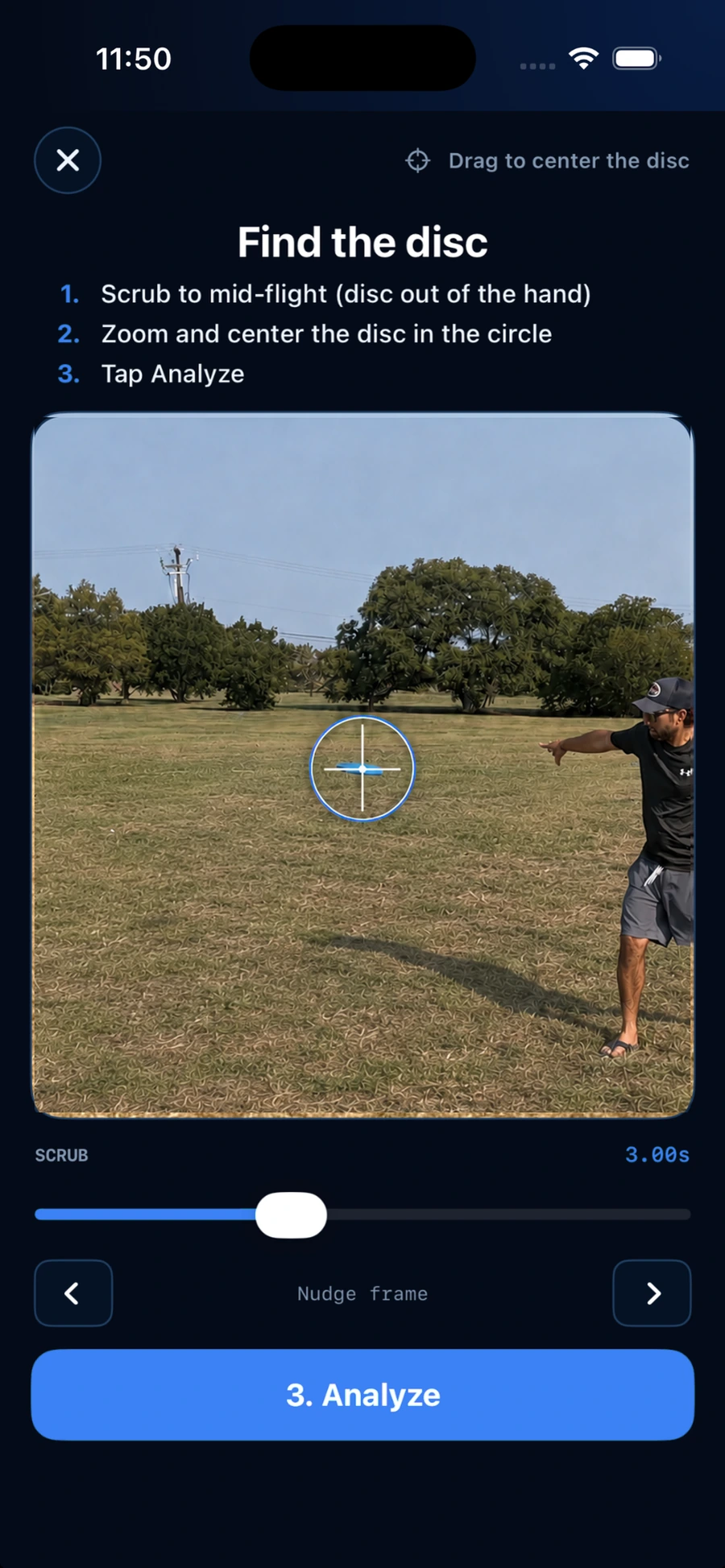
Find the disc before analyzing
Scrub to a clear mid-flight frame, pinch to zoom, and center the disc completely in the finder circle. If the disc is blurred, blocked, or too small to identify, try a clearer frame or record another throw.
If the result is unclear
Check that the disc is in focus, well lit, and clear of your hand. If necessary, move the camera or choose another frame before analyzing.